

progress. Simkl tracks the active session, shows the title in the user’s “Watching now” banner, and marks the item watched once playback completes.
If you only need a “Mark as watched” button without real-time progress reporting, use Mark as watched instead.
progress on its own between your events, using the item’s known runtime, so silence is not a gap it needs you to fill — it’s the normal state. You are reporting state changes, not keeping a progress bar alive.This is the single most common mistake in scrobble integrations, and it’s expensive:progress variable and let the next real user event carry it.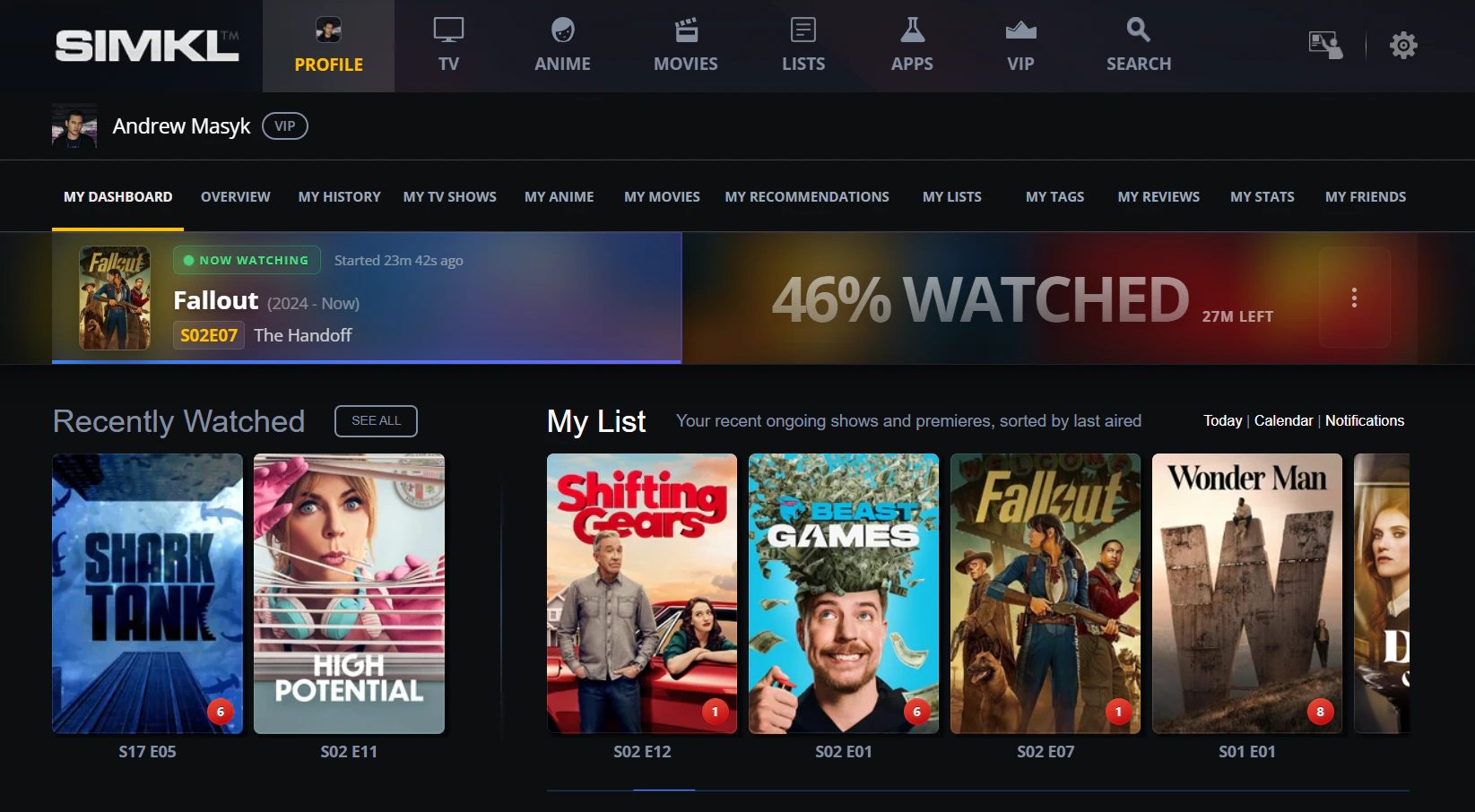
The "Now Watching" banner on the user dashboard. The progress bar updates live — for [`/scrobble/start`](/api-reference/simkl/scrobble-start) it reflects the most recent `progress` you sent; for [`/scrobble/checkin`](/api-reference/simkl/scrobble-checkin) Simkl extrapolates from the item runtime.
The lifecycle at a glance
Four endpoints. The 80% threshold is the only “magic number” you have to remember.Which pattern do I need?
Universal player-event mapping
This is the table to keep open while you’re wiring your player. It’s intentionally player-agnostic — the same mapping works for HTML5<video>, AVPlayer, ExoPlayer, libVLC-based players, Kodi, Roku, Stremio addons, and anything else that emits playback events.
Handling seek and scrub events
When the user drags the playhead — fast-forwarding, rewinding, or scrubbing aggressively — don’t fire a scrobble call for the seek itself. Just update your localprogress variable. The next real player event (play / pause / stop) reports the new position.
Why? Each scrobble call counts against your client’s request budget, and the server’s 20-second per-user lock will reject overlapping in-flight calls. A user who scrubs three times per minute would burn 180 calls/hour for nothing — and miss the actual lifecycle events.
Here’s a typical session with seeks, showing which events fire calls and which don’t:
Progress can be non-monotonic between calls. A user can pause at 80%, rewind, and stop at 30% — the second progress: 30 is correct and your code shouldn’t try to “fix” it. The server stores whatever you send.
The ≥80% auto-scrobble threshold only fires on stop, not pause. A user can scrub past 80% mid-playback dozens of times without triggering the watched mark — it only counts when they actually stop.
start only puts the title in the “Watching now” banner. The item is marked watched only when:- you call
/scrobble/stopwithprogress >= 80, or - you used
/scrobble/checkinand Simkl’s runtime-based progress reaches 100%, or - you separately call
POST /sync/history.
Reference scrobbler implementations
Below is the same minimalScrobbler in four languages. Each one:
- exposes
start(item),pause(progress),stop(progress)andcheckin(item), - attaches the standard auth header and required URL params,
- shows how to wire it to a real player’s events.
movie field with show + episode or anime + episode (see Examples below).
Continue Watching across devices
Pause/stop on one device, resume on another. Any signed-in device with the sameaccess_token can pick up where the user left off. The pattern:
Device A: pause
POST /scrobble/pause with the user’s token and current progress. Simkl saves the position as a playback.Device B: gate the refetch on activities
POST /sync/activities returns a playback timestamp per media-type bucket. Compare it to the value you saved last sync — if it hasn’t moved, no new pause has happened and you can skip the next step.Device B: discover
playback timestamp moved: GET /sync/playback returns all paused playbacks for this user (or narrow with /sync/playback/episodes / /sync/playback/movies if your UI only renders one kind). Save the new timestamp.Device B: resume
POST /scrobble/start with the same item and the saved progress. Simkl continues the session; the prior pause is cleared automatically.hide_watched=true (the default) deliberately leaves it in. Don’t filter those out; the user really is watching it again. Details in How playbacks work → already-watched items.Rewatches (watching something again)
By default, scrobbling something the user has already finished records nothing. Simkl sees a duplicate watch and drops it, so the user’s rewatch count never moves. To log it as a separate viewing session, add?allow_rewatch=yes to the stop call:
rewatch_status, never on rewatch_id — a session that’s already running reports its id even when it rejected your watch.
start./scrobble/start auto-finishes the user’s previous unfinished playback before opening a new one, and it honours the flag while doing it. Concretely: the user left Dune at 90% last night without a clean stop, then presses play on Arrival tonight — your /scrobble/start for Arrival logs a rewatch of Dune, and nothing in the response says so. A player that sets the flag globally will do this to real users./scrobble/pause is harmless but pointless: pausing marks nothing watched, so no session can be created.Check-ins can rewatch too
If your app usescheckin rather than the start/stop loop, ?allow_rewatch=yes works there as well — but asynchronously. A check-in doesn’t mark anything watched when you call it, so Simkl stores the opt-in on the check-in and applies it when the check-in matures at the end of the item’s runtime.
rewatch_id or rewatch_status — nothing has happened yet. Read the session back from GET /sync/all-items?allow_rewatch=yes if you need to confirm it.
Two gotchas: the PRO / VIP check runs at check-in time, so a plan that lapses before maturation doesn’t cancel the rewatch; and the choice is frozen once the check-in is recorded — deleting the playback before it matures cancels the whole check-in, rewatch included.
If you can reliably catch a stop event, prefer stop for rewatches. You get an immediate answer instead of having to poll for one.
Three more rules before you ship it:
- PRO / VIP only. Check
account.typefromGET /users/settingsat sign-in, cache it, and refetch only whenactivities.settings.allfromPOST /sync/activitiesbumps — the same gate you already use for playbacks. - Default off. Ship a Track rewatches toggle that starts disabled. Many users just want “watched”.
- Require explicit intent. A “Watching again” button, or a prompt when the user replays something already completed. Never infer a rewatch from playback alone — retries, seeks, and stale sessions all look like repeat watches.
Rewatches guide — sessions, episode tracking, UI patterns
active / completed / closed), the 2-day gap, reading sessions back from GET /sync/all-items, and simkl.com-style UI patterns.Anime episode numbering
Anime and Western TV catalogs disagree about what an “episode” is. Simkl supports both numbering schemes and maps between them automatically — pick whichever IDs your source naturally exposes and scrobble with that. Simkl resolves to the same canonical record either way.Two numbering models
Scrobble with whichever IDs you have
Anime-native (anidb / mal / anilist): pass the anime-cour ID and a plain episode number — noseason needed.
episode.ids. Prefer season + number whenever you can though: episode IDs can be re-issued when the source catalog merges duplicates or re-numbers a season, and a stale ID returns 404, while season + number is stable forever. See Standard media objects → Episode IDs.
How Simkl maps between them
Internally Simkl stores its own episode ID per anime title, mapped to the matching TVDBseason + number (and AniDB episode ID where available). When you scrobble using Western catalog season numbers (TVDB, TMDB, IMDB), Simkl walks that mapping to find the right per-anime episode; when you scrobble using any anime-native ID (anidb, mal, anilist, kitsu, anisearch, animeplanet, livechart) with a plain episode number, it goes straight to the canonical record.
Every scrobble response echoes both representations so your client can update either UI:
season/number— AniDB-canonical (per anime-cour numbering)tvdb_season/tvdb_number— the TVDB-style equivalent
Gotchas and FAQ
Should I poll progress every N seconds?
Should I poll progress every N seconds?
User seeks within the same item
User seeks within the same item
User scrubs back and forth across the 80% mark
User scrubs back and forth across the 80% mark
/scrobble/stop, not on every progress report. A user can scrub past 80% mid-playback as many times as they want without triggering the watched mark. The server just notes “watched” at the moment of stop if progress >= 80. So:- User pauses at 90% → saved at 90%, not marked watched
- User stops at 90% → action:
scrobble, marked watched - User stops at 75%, then resumes and stops at 95% → action:
scrobble, marked watched on the second stop - User stops at 95%, then later rewinds to 30% and stops there → previous watched state stays; the new pause at 30% is just a saved position
Connection drops mid-loop
Connection drops mid-loop
404 id_err on /scrobble/start
404 id_err on /scrobble/start
/search/id with the same external IDs you already sent — Simkl already tried those and failed. Realistic fallbacks:- Filename-based match — if your player knows the file path, call
POST /search/file. Filename uses different signals (release-group tags, year-in-name, etc.) than external IDs and may resolve where IDs didn’t. - Title text search — if you have a title but no good IDs, call
GET /search/{type}and let the user pick from results. - Cache the negative — if nothing resolves, remember it so you don’t keep retrying the same un-matchable item every playback.
- Ask the user — surface a “couldn’t identify this title” UI so the user can correct it manually.
Item not in Simkl's catalog at all
Item not in Simkl's catalog at all
User pauses without a prior start
User pauses without a prior start
Multiple titles played in one session
Multiple titles played in one session
Long-form content (3+ hour movies)
Long-form content (3+ hour movies)
User manually marks watched while my scrobble loop is active
User manually marks watched while my scrobble loop is active
stop won’t double-count — Simkl returns 409 if the same session has already been completed within the last hour.Cross-device resume — does it just work?
Cross-device resume — does it just work?
GET /sync/playback to fetch all saved playbacks (or narrow with /sync/playback/episodes / /sync/playback/movies if you only render one kind); you call /scrobble/start with the saved progress to resume.What if the user deletes the title from their watchlist?
What if the user deletes the title from their watchlist?
Stremio / future addon SDKs
Stremio / future addon SDKs
/scrobble/checkin for a fire-and-forget watching-now status.checkin vs start: when do I really pick checkin?
checkin vs start: when do I really pick checkin?
checkin when (a) you can detect that playback began but (b) you cannot reliably catch the stop — e.g. embedded players, casting flows, browser extensions where the page may close without a clean event. Simkl extrapolates progress from start time + runtime and auto-marks the item watched at 100%. You can still call /scrobble/stop later to override the auto-completion if you do catch a stop event.Auto-completion timing: When the computed progress reaches 100%, the title is auto-marked watched shortly after — typically within ~2 minutes. The delay is normal and consistent across all checkin sessions.Anime episode numbering
Anime episode numbering
season + number. Simkl supports both — see the Anime episode numbering section above for examples and the internal mapping.User is rewatching something they already finished
User is rewatching something they already finished
?allow_rewatch=yes to the stop call to log it as a separate viewing session instead. The stop still needs progress ≥ 80; below that it’s just a pause and no rewatch fields come back. It’s a Simkl PRO / VIP feature, it should be behind explicit user intent, and it goes on stop or checkin — never start. Full rules in Rewatches above.Why did my rewatch come back as first_watch or too_soon?
Why did my rewatch come back as first_watch or too_soon?
first_watch— Simkl didn’t consider this a repeat, because the user hadn’t finished the item before. The watch was still recorded, just in normal history.too_soon— the same movie or episode was already watched within the last 2 days. The gap exists so that player retries, aggressive scrubbing past 80%, and importer re-runs don’t inflate the user’s history with phantom sessions. Wait it out, or accept the single watch.
rewatch_status and not rewatch_id: a session that’s already running returns its id even when it rejected your watch.Reference
Request bodies
progress is a float from 0 to 100 with up to 2 decimal places. Send 75, 75.0, 75.12, or 75.00 — responses normalize (e.g. 75 not 75.00).
- Movie
- TV show
- Anime
- Checkin
Action types in responses
Session lifecycle details
Only one active session per item per user
Only one active session per item per user
/scrobble/start (or /scrobble/checkin) for a new item replaces any existing session for that item and clears previous pauses.Auto-expiry
Auto-expiry
- Start and checkin sessions expire after the item’s remaining runtime.
- Stop sessions expire 1 hour after the call (used for duplicate prevention).
- Pause sessions expire immediately but persist as saved playbacks.
Rate limiting (the 20-second lock)
Rate limiting (the 20-second lock)
429-style throttling.Duplicate prevention
Duplicate prevention
409. This prevents accidental double-scrobbles. The 409 body contains watched_at and expires_at so you know when the protection ends.Managing paused playbacks
The user can browse their saved playbacks at simkl.com/my/history/playback-progress-manager. Programmatically:Get playback sessions
GET /sync/playback — list saved playbacks for resume UIs (or narrow with /sync/playback/:type where :type is episodes or movies).Delete a playback
DELETE /sync/playback/:id — remove a saved playback.See also
Start
POST /scrobble/start — show “Watching now”; resume a paused session.Pause
POST /scrobble/pause — save progress so the user can resume.Stop
POST /scrobble/stop — end session; >= 80 marks watched.Checkin
POST /scrobble/checkin — auto-mark watched at 100% based on runtime.Sync guide
Rewatches guide
?allow_rewatch=yes on stop, session states, the 2-day gap, PRO / VIP gate.Standard media objects
ids structure for movies, shows, anime, and episodes.