

POST /sync/history instead.
This page is a reference index. The lifecycle, decision tree, platform recipes, and gotchas live in the Scrobble guide:
Scrobble guide — full walkthrough
Mermaid state diagram of the lifecycle, “checkin vs scrobble loop” decision tree, universal player-event mapping table, reference Scrobbler implementations in Python / JavaScript / Swift / TypeScript, seek/scrub handling, and a gotchas FAQ.
ids) so Simkl can detect the item reliably.
progress is a percentage from 0.00 to 100.00. The input format is flexible (max 2 decimal places — 75, 75.0, 75.12 are all fine); responses are standardized (75, 75.12, 45.5). Scrobble IDs are 64-bit integers.
One call per user action, never on a timer.Send a scrobble event only when the user does something — pressed Play, Paused, Stopped, closed the player, or the episode ended. While the video is playing and the user is doing nothing, send nothing at all.There is no heartbeat and no “report progress every N seconds” in this API. Simkl advances
progress on its own between your events using the item’s known runtime, so a 45-minute episode is 2 calls, not 90. Polling produces an identical result while burning 45× the rate limit, and gets apps throttled.Full breakdown, including seek/scrub handling, in the Scrobble guide.What each endpoint does
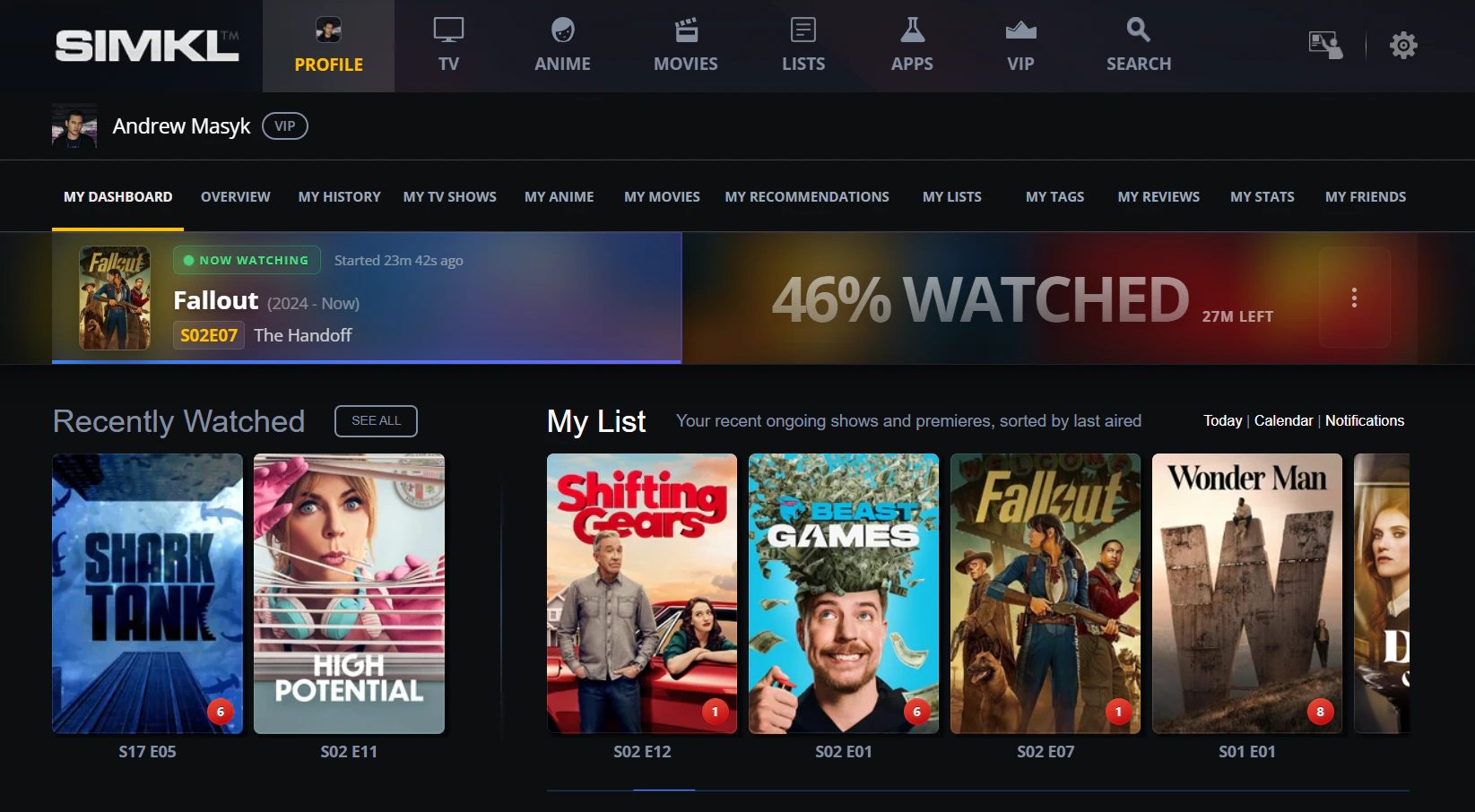
The "Now Watching" banner on the user dashboard, fed by [`/scrobble/start`](/api-reference/simkl/scrobble-start) and [`/scrobble/checkin`](/api-reference/simkl/scrobble-checkin). The progress bar updates from the `progress` you send (start / pause / stop) or, for checkin, is extrapolated from the item runtime.
Start ≠ watched. A bare
start only puts the title in the user’s “Watching now” banner. The item gets marked as watched only when:- you call
stopwith progress ≥ 80%, or - you used
checkinand the auto-tracked progress reaches 100%, or - you separately call
POST /sync/history.
How it works
Simkl stores one active scrobble session per show/movie/anime. Calling/scrobble/start replaces any existing session for that item and clears previous pauses. Paused sessions (created by /scrobble/pause, or by /scrobble/stop with progress under 80%) can be retrieved via Get Playbacks and resumed by calling /scrobble/start again with the same item. To delete a paused session, use Delete Playback.
Lifecycle at a glance
Progress drives every transition. The 80% threshold is the only “magic number” you have to remember.- Two ways to mark something watched. Either drive
start→stop≥ 80% yourself, or firecheckinonce and let Simkl auto-complete from the item’s runtime. progressis required forstart/pause/stop(defaults to0if you omit it). Oncheckinit is silently dropped server-side.simklID alone is enough for any of the four endpoints. Title + year + extra IDs help when you don’t have asimklID and need Simkl’s matcher to find the item.
Typical flow
Playback begins
User presses Play in your app →
POST /scrobble/start (or /scrobble/checkin if you want auto-completion). Title appears in the “Watching now” banner.User pauses
User pauses →
POST /scrobble/pause with current progress. The session is kept as resumable.User resumes
User unpauses →
POST /scrobble/start again with current progress. Same session continues.User stops
User stops or finishes →
POST /scrobble/stop with current progress. ≥ 80% marks watched; lower is kept as a pause.Members can view and manage their saved playbacks at simkl.com/my/history/playback-progress-manager/.
Action types in responses
The responseaction field tells you what Simkl did with your call:
Session management
- Expiry timestamps: start = now + remaining runtime; stop = now + 1 hour; pause = now.
- Persistence: sessions persist until manually removed or replaced by the next scrobble for that title. Retention by plan: Free 7 days, PRO 30 days, VIP 90 days.
- Rate limiting: one scrobble operation per user at a time (20-second lock).
- Duplicate prevention:
409if you try to stop an already-completed session within 1 hour.
Anime episode numbering
Simkl uses AniDB as the primary source for anime data, which numbers seasons/episodes differently from TMDB/TVDB. When you scrobble anime using TMDB season/episode numbers, Simkl maps them to the corresponding AniDB episode. Responses include both the Simkl/AniDB numbers (season, number) and the original TVDB numbers (tvdb_season, tvdb_number) for reference.
Rewatches
Scrobbling something the user has already finished records nothing by default — Simkl treats it as a duplicate and drops it. Add?allow_rewatch=yes to log it as a separate viewing session instead.
On
stop the rewatch is immediate and the outcome comes straight back. On checkin it is deferred: a check-in marks nothing watched at request time, so Simkl stores the opt-in on the check-in and applies it when the check-in matures at the end of the item’s runtime. The check-in response therefore carries no rewatch fields, the PRO / VIP check runs at check-in time rather than at maturation, and the choice is frozen once the row is written.
Don’t send it on
start. It auto-finishes the user’s previous unfinished playback before opening a new one and honours the flag while doing it — so the flag on start can log a rewatch of a different title, with nothing in the response to tell you. Put it on stop or checkin, and only when the user explicitly asked.Rewatches guide
Full walkthrough — every status value, the PRO / VIP check, the 2-day gap, and how to wire it into a player.
Stop endpoint reference
Parameter reference for
allow_rewatch and the full rewatch_status table.Endpoints
Start
POST /scrobble/start — show “Watching now”; resume a paused session.Checkin
POST /scrobble/checkin — auto-mark watched at 100% based on runtime.Pause
POST /scrobble/pause — save progress so the user can resume.Stop
POST /scrobble/stop — end session; ≥ 80% marks watched.Playbacks
Get playbacks
GET /sync/playback — list saved paused playbacks (cross-device resume; optionally narrow with /:type where :type is episodes or movies).Delete playback
DELETE /sync/playback/:id — remove a saved playback by ID.