> ## Documentation Index
> Fetch the complete documentation index at: https://api.simkl.org/llms.txt
> Use this file to discover all available pages before exploring further.

# Scrobbling playback

> Report real-time playback to Simkl with start, pause, stop, and checkin. Auto-mark items watched at 80% (stop) or 100% (checkin).

**Scrobbling** is how a media player reports real-time playback to Simkl. As the user starts, pauses, and finishes watching, your app sends events with the current `progress`. Simkl tracks the active session, shows the title in the user's "Watching now" banner, and marks the item watched once playback completes.

If you only need a "Mark as watched" button without real-time progress reporting, use [Mark as watched](/guides/mark-as-watched) instead.
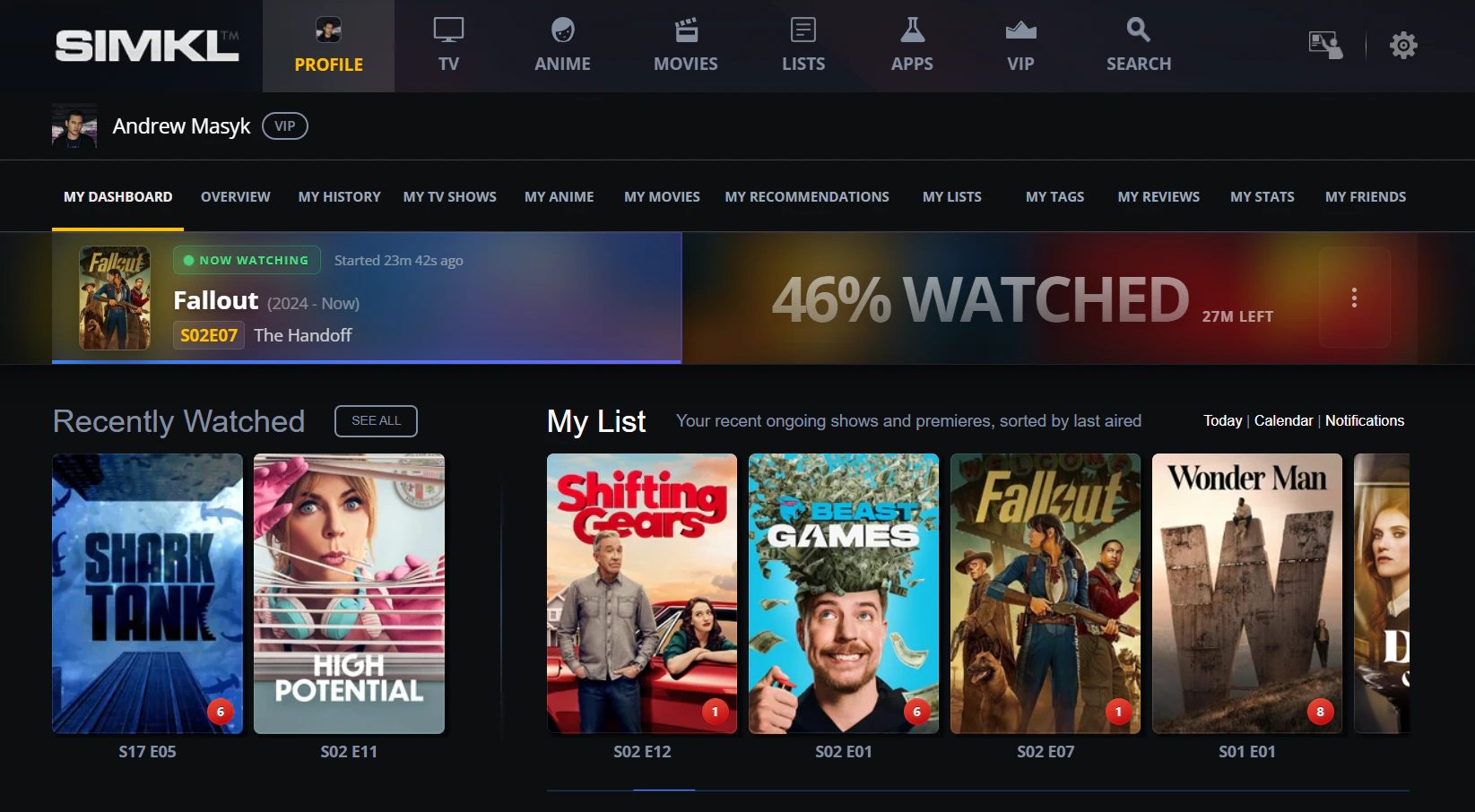
<Frame caption="The &#x22;Now Watching&#x22; banner on the user dashboard. The progress bar updates live — for [`/scrobble/start`](/api-reference/simkl/scrobble-start) it reflects the most recent `progress` you sent; for [`/scrobble/checkin`](/api-reference/simkl/scrobble-checkin) Simkl extrapolates from the item runtime.">
  <img src="https://mintcdn.com/andrewmasyk/RbJc6mqlYX6FcPwH/images/watching-now-dashboard.webp?fit=max&auto=format&n=RbJc6mqlYX6FcPwH&q=85&s=a71e052e0bbc1f376f6dc58f9785517a" alt="Simkl user dashboard showing 'NOW WATCHING' Fallout S02E07 'The Handoff' with a 46% watched progress bar and 27 minutes left" width="1645" height="906" data-path="images/watching-now-dashboard.webp" />
</Frame>

## The lifecycle at a glance

Four endpoints. The 80% threshold is the only "magic number" you have to remember.

| Endpoint                                               | Call when                   | Effect                                                                                                                        |
| ------------------------------------------------------ | --------------------------- | ----------------------------------------------------------------------------------------------------------------------------- |
| **[`start`](/api-reference/simkl/scrobble-start)**     | Playback begins or resumes  | Creates an active session and shows the title in the user's "Watching now" banner.                                            |
| **[`pause`](/api-reference/simkl/scrobble-pause)**     | User pauses                 | Saves current `progress`. The session is resumable from any device on the same account.                                       |
| **[`stop`](/api-reference/simkl/scrobble-stop)**       | User stops or playback ends | `progress ≥ 80` → marked **watched**. `progress < 80` → kept as a **saved playback** (resumable later).                       |
| **[`checkin`](/api-reference/simkl/scrobble-checkin)** | Fire-and-forget alternative | One call, no progress tracking. Server auto-completes shortly after the item's runtime expiry — typically within \~2 minutes. |

<Tip>
  **Send every identifier you have — `title`, `year`, and the full `ids` object.**

  Simkl walks the `ids` object in priority order (`simkl` first when present, then external IDs like `imdb`, `tmdb`, `tvdb`, `mal`, `anidb`, …). If no ID resolves, it falls back to a `title` + `year` match, then to title-only as a last resort. Sending everything you know — title, year, plus every external ID your client has cached — maximizes the chance the right item gets credited. Extra fields are free; missing fields can cause a `404 id_err` or, worse, a silent mismatch.

  **You don't need to search before writing.** Endpoints like `/scrobble/*`, `/sync/history`, `/sync/add-to-list`, and `/sync/ratings` resolve IDs server-side — pass whatever you have directly, no `/search/*` round-trip required. Calling `/search/id` first to "resolve" a Simkl ID is wasted work that doubles your API quota for no gain.

  See [Supported ID keys](/conventions/standard-media-objects#supported-id-keys) for the full list.
</Tip>

## Which pattern do I need?

```mermaid theme={"theme":{"light":"github-light","dark":"vesper"}}
flowchart TD
    Q1{Does your player emit play / pause / stop events?}
    Q1 -->|yes| Q2{Need live 'Watching now'<br/>plus cross-device resume?}
    Q1 -->|no, fire-and-forget| CHECKIN[Use POST /scrobble/checkin]
    Q2 -->|yes| LOOP[Use start / pause / stop loop]
    Q2 -->|no, just credit a watch| HISTORY[Use POST /sync/history]
    LOOP --> RESULT1[Live tracking + cross-device resume<br/>progress >= 80 auto-marks watched]
    CHECKIN --> RESULT2[Lightweight; auto-completes at runtime expiry<br/>no follow-up calls needed]
    HISTORY --> RESULT3[Just records the watch<br/>no live status<br/>see Mark-as-watched guide]
```

<Danger>
  **Do not poll `/scrobble/*` periodically.** Send events **only on real user actions** — pressed Play, Paused, Stopped — with the current `progress` percentage. Simkl automatically advances progress between events using the item's known runtime, so periodic re-posting wastes API quota and triggers rate limits.
</Danger>

## Universal player-event mapping

This is the table to keep open while you're wiring your player. It's intentionally player-agnostic — the same mapping works for HTML5 `<video>`, AVPlayer, ExoPlayer, libVLC-based players, Kodi, Roku, Stremio addons, and anything else that emits playback events.

| Player event                                    | Scrobble call                                                        | When / why                                                         |
| ----------------------------------------------- | -------------------------------------------------------------------- | ------------------------------------------------------------------ |
| Playback started (from beginning)               | `POST /scrobble/start` with `progress: 0`                            | First time the user opens the title.                               |
| Playback resumed (from pause)                   | `POST /scrobble/start` with current `progress`                       | Replaces the existing session and clears prior pauses.             |
| User pauses                                     | `POST /scrobble/pause` with current `progress`                       | Server saves the session for cross-device resume.                  |
| User stops or closes the player                 | `POST /scrobble/stop` with current `progress`                        | Below 80 saves a paused session; >= 80 marks watched.              |
| Playback ends naturally (credits / next-up)     | `POST /scrobble/stop` with `progress: 100`                           | Server marks the title watched.                                    |
| User seeks (any direction) within the same item | **No call**                                                          | Update your local `progress` variable. Reported on the next event. |
| User scrubs aggressively                        | **No call**                                                          | Same rule. The 20-sec lock would reject overlapping calls anyway.  |
| User changes subtitles or audio track           | (no call)                                                            | Doesn't affect progress.                                           |
| User skips to next episode                      | `POST /scrobble/stop` (current item) → `POST /scrobble/start` (next) | Two calls, both at the right `progress`.                           |
| Network error during a call                     | retry on next event                                                  | Don't loop on retries — the next real event covers it.             |

## Handling seek and scrub events

When the user drags the playhead — fast-forwarding, rewinding, or scrubbing aggressively — **don't fire a scrobble call for the seek itself**. Just update your local `progress` variable. The next real player event (play / pause / stop) reports the new position.

Why? Each scrobble call counts against your client's request budget, and the server's 20-second per-user lock will reject overlapping in-flight calls. A user who scrubs three times per minute would burn 180 calls/hour for nothing — and miss the actual lifecycle events.

Here's a typical session with seeks, showing which events fire calls and which don't:

```mermaid theme={"theme":{"light":"github-light","dark":"vesper"}}
sequenceDiagram
    participant U as User
    participant P as Player
    participant S as Simkl

    U->>P: presses Play
    P->>S: POST /scrobble/start (progress: 0)
    Note over P: User watches normally
    U->>P: seeks forward to 30%
    Note over P,S: no API call — just update local progress
    U->>P: seeks back to 10% (rewatch)
    Note over P,S: no API call
    U->>P: pauses
    P->>S: POST /scrobble/pause (progress: 10)
    Note over S: Saves session at 10%
    U->>P: resumes
    P->>S: POST /scrobble/start (progress: 10)
    U->>P: seeks forward to 95%
    Note over P,S: no API call
    U->>P: closes player
    P->>S: POST /scrobble/stop (progress: 95)
    Note over S: progress >= 80% → action: "scrobble" (marked watched)
```

**Progress can be non-monotonic between calls.** A user can pause at 80%, rewind, and stop at 30% — the second `progress: 30` is correct and your code shouldn't try to "fix" it. The server stores whatever you send.

**The ≥80% auto-scrobble threshold only fires on [`stop`](/api-reference/simkl/scrobble-stop)**, not pause. A user can scrub past 80% mid-playback dozens of times without triggering the watched mark — it only counts when they actually [`stop`](/api-reference/simkl/scrobble-stop).

<Note>
  **Start ≠ watched.** A bare [`start`](/api-reference/simkl/scrobble-start) only puts the title in the "Watching now" banner. The item is marked watched only when:

  * you call [`/scrobble/stop`](/api-reference/simkl/scrobble-stop) with `progress >= 80`, **or**
  * you used [`/scrobble/checkin`](/api-reference/simkl/scrobble-checkin) and Simkl's runtime-based progress reaches 100%, **or**
  * you separately call [`POST /sync/history`](/api-reference/simkl/add-to-history).
</Note>

## Reference scrobbler implementations

Below is the same minimal `Scrobbler` in four languages. Each one:

* exposes `start(item)`, `pause(progress)`, `stop(progress)` and `checkin(item)`,
* attaches the standard auth header and required URL params,
* shows how to wire it to a real player's events.

Adapt the movie payload to TV / anime by replacing the `movie` field with `show` + `episode` or `anime` + `episode` (see [Examples](#request-bodies) below).

<CodeGroup>
  ```python Python (Kodi-addon-style) theme={"theme":{"light":"github-light","dark":"vesper"}}
  # Generic Python scrobbler. Drop into any player that has play/pause/stop hooks.
  # Tested shape: works as-is from a Kodi service add-on, mpv Lua bridge, or any
  # Python-driven player.
  import requests

  API = "https://api.simkl.com"
  PARAMS = {
      "client_id":   "YOUR_CLIENT_ID",
      "app-name":    "my-app-name",
      "app-version": "1.0",
  }
  HEADERS = {
      "Authorization": "Bearer USER_ACCESS_TOKEN",
      "User-Agent":    "my-app-name/1.0",
      "Content-Type":  "application/json",
  }

  class Scrobbler:
      def __init__(self, item):
          # item example: {"movie": {"title": "Inception", "year": 2010,
          #                          "ids": {"imdb": "tt1375666"}}}
          self.item = item

      def _post(self, action, progress=None):
          body = dict(self.item)
          if progress is not None:
              body["progress"] = progress
          r = requests.post(f"{API}/scrobble/{action}",
                            params=PARAMS, headers=HEADERS, json=body, timeout=10)
          r.raise_for_status()
          return r.json()

      def start(self, progress=0):    return self._post("start",   progress)
      def pause(self, progress):      return self._post("pause",   progress)
      def stop(self,  progress):      return self._post("stop",    progress)
      def checkin(self):              return self._post("checkin")

  # Wire-up: call from your player's onPlaybackStarted / onPaused / onStopped hooks.
  # scrob = Scrobbler({"movie": {"title": "Inception", "year": 2010,
  #                              "ids": {"imdb": "tt1375666"}}})
  # scrob.start(0)             # on play
  # scrob.pause(45.2)          # on pause, with current progress %
  # scrob.start(45.2)          # on resume
  # scrob.stop(100)            # on natural end -> marks watched
  ```

  ```javascript JavaScript (HTML5 / browser extension) theme={"theme":{"light":"github-light","dark":"vesper"}}
  // Drop-in scrobbler for an HTML5 <video> element or a browser extension.
  const API = "https://api.simkl.com";
  const QS  = new URLSearchParams({
    client_id:     "YOUR_CLIENT_ID",
    "app-name":    "my-app-name",
    "app-version": "1.0",
  });
  const HEADERS = {
    "Authorization": "Bearer USER_ACCESS_TOKEN",
    "User-Agent":    "my-app-name/1.0",
    "Content-Type":  "application/json",
  };

  class Scrobbler {
    constructor(item) { this.item = item; }
    async _post(action, progress) {
      const body = progress == null ? this.item : { ...this.item, progress };
      const res  = await fetch(`${API}/scrobble/${action}?${QS}`, {
        method: "POST", headers: HEADERS, body: JSON.stringify(body),
      });
      if (!res.ok) throw new Error(`scrobble ${action} ${res.status}`);
      return res.json();
    }
    start(p = 0) { return this._post("start",   p); }
    pause(p)     { return this._post("pause",   p); }
    stop(p)      { return this._post("stop",    p); }
    checkin()    { return this._post("checkin"); }
  }

  // Wire-up to a <video> element. Progress is computed from currentTime / duration.
  const video = document.querySelector("video");
  const scrob = new Scrobbler({
    movie: { title: "Inception", year: 2010, ids: { imdb: "tt1375666" } },
  });
  const pct = () => (video.duration ? (video.currentTime / video.duration) * 100 : 0);

  video.addEventListener("play",   () => scrob.start(pct()));
  video.addEventListener("pause",  () => scrob.pause(pct()));
  video.addEventListener("ended",  () => scrob.stop(100));
  window.addEventListener("beforeunload", () => scrob.stop(pct()));
  ```

  ```swift Swift (AVPlayer / iOS / tvOS) theme={"theme":{"light":"github-light","dark":"vesper"}}
  import AVFoundation
  import Foundation

  let api  = URL(string: "https://api.simkl.com")!
  let qs   = "client_id=YOUR_CLIENT_ID&app-name=my-app-name&app-version=1.0"
  let auth = "Bearer USER_ACCESS_TOKEN"

  final class Scrobbler {
      let item: [String: Any]   // e.g. ["movie": ["title": "Inception", "year": 2010,
                                //                "ids": ["imdb": "tt1375666"]]]
      init(item: [String: Any]) { self.item = item }

      func post(_ action: String, progress: Double? = nil) {
          var body = item
          if let p = progress { body["progress"] = p }
          var req = URLRequest(url: api.appendingPathComponent("scrobble/\(action)")
                                       .appending(query: qs))
          req.httpMethod = "POST"
          req.setValue(auth,                  forHTTPHeaderField: "Authorization")
          req.setValue("application/json",    forHTTPHeaderField: "Content-Type")
          req.setValue("my-app-name/1.0",     forHTTPHeaderField: "User-Agent")
          req.httpBody = try? JSONSerialization.data(withJSONObject: body)
          URLSession.shared.dataTask(with: req).resume()
      }
      func start(_ p: Double = 0) { post("start",   progress: p) }
      func pause(_ p: Double)     { post("pause",   progress: p) }
      func stop(_  p: Double)     { post("stop",    progress: p) }
      func checkin()              { post("checkin") }
  }

  // Wire-up: observe AVPlayer time + rate.
  let player = AVPlayer(url: mediaURL)
  let scrob  = Scrobbler(item: ["movie": ["title": "Inception", "year": 2010,
                                          "ids": ["imdb": "tt1375666"]]])
  func progress() -> Double {
      guard let d = player.currentItem?.duration.seconds, d > 0 else { return 0 }
      return player.currentTime().seconds / d * 100
  }
  player.addObserver(forKeyPath: "rate") { rate in
      rate > 0 ? scrob.start(progress()) : scrob.pause(progress())
  }
  NotificationCenter.default.addObserver(forName: .AVPlayerItemDidPlayToEndTime,
                                         object: player.currentItem, queue: .main) { _ in
      scrob.stop(100)
  }
  ```

  ```typescript TypeScript (Node.js / Stremio-style addon) theme={"theme":{"light":"github-light","dark":"vesper"}}
  import fetch from "node-fetch";

  const API     = "https://api.simkl.com";
  const QS      = "client_id=YOUR_CLIENT_ID&app-name=my-app-name&app-version=1.0";
  const HEADERS = {
    "Authorization": "Bearer USER_ACCESS_TOKEN",
    "User-Agent":    "my-app-name/1.0",
    "Content-Type":  "application/json",
  };

  type Item = { movie?: object; show?: object; anime?: object; episode?: object };

  export class Scrobbler {
    constructor(private readonly item: Item) {}

    private async post(action: string, progress?: number) {
      const body = progress == null ? this.item : { ...this.item, progress };
      const res  = await fetch(`${API}/scrobble/${action}?${QS}`, {
        method: "POST", headers: HEADERS, body: JSON.stringify(body),
      });
      if (!res.ok) throw new Error(`scrobble ${action} ${res.status}`);
      return res.json();
    }
    start  = (p = 0)   => this.post("start",   p);
    pause  = (p: number) => this.post("pause", p);
    stop   = (p: number) => this.post("stop",  p);
    checkin = ()       => this.post("checkin");
  }

  // Wire-up: in an addon SDK, dispatch on player events emitted by the host.
  // const scrob = new Scrobbler({ movie: { title: "Inception", year: 2010,
  //                                        ids: { imdb: "tt1375666" } } });
  // host.on("play",   ({ progress }) => scrob.start(progress));
  // host.on("pause",  ({ progress }) => scrob.pause(progress));
  // host.on("ended",  ()             => scrob.stop(100));
  // host.on("close",  ({ progress }) => scrob.stop(progress));
  ```
</CodeGroup>

<Tip>
  The Scrobbler classes above intentionally skip retry/backoff and token refresh — those are app-level concerns. Wire your existing HTTP client and auth layer in their place; the scrobble lifecycle is just four POSTs.
</Tip>

## Continue Watching across devices

Pause/stop on one device, resume on another. Any signed-in device with the same `access_token` can pick up where the user left off. The pattern:

<Steps>
  <Step title="Device A: pause">
    `POST /scrobble/pause` with the user's token and current `progress`. Simkl saves the position as a [playback](/api-reference/playback).
  </Step>

  <Step title="Device B: gate the refetch on activities">
    [`POST /sync/activities`](/api-reference/simkl/get-activities) returns a `playback` timestamp per media-type bucket. **Compare it to the value you saved last sync** — if it hasn't moved, no new pause has happened and you can skip the next step.
  </Step>

  <Step title="Device B: discover">
    Only when the `playback` timestamp moved: `GET /sync/playback` returns all paused playbacks for this user (or narrow with `/sync/playback/episodes` / `/sync/playback/movies` if your UI only renders one kind). Save the new timestamp.
  </Step>

  <Step title="Device B: resume">
    `POST /scrobble/start` with the same item and the saved `progress`. Simkl continues the session; the prior pause is cleared automatically.
  </Step>
</Steps>

<Warning>
  **Don't poll [`/sync/playback`](/api-reference/simkl/get-playback-sessions) on a timer.** Always gate refetches on the `playback` timestamp from [`/sync/activities`](/api-reference/simkl/get-activities) — that endpoint is the cheap "is anything new?" check. Idle accounts won't trip the gate, so quota stays free for active users. The same pattern applies to every Sync surface (history, watchlist, ratings); see the [Sync guide](/guides/sync) for the full strategy.
</Warning>

Members can also browse and clean up their saved playbacks at the [Playback progress manager](https://simkl.com/my/history/playback-progress-manager/).

## Anime episode numbering

Anime and Western TV catalogs disagree about what an "episode" is. Simkl supports **both numbering schemes** and maps between them automatically — pick whichever IDs your source naturally exposes and scrobble with that. Simkl resolves to the same canonical record either way.

<Tip>
  **Pick the key that matches your data, or default to `show` / `shows[]` when unsure.** Simkl looks every item up by `ids` and routes to the correct catalog (TV or anime) — so the wrapper you choose is for clarity, not routing. Scrobble accepts singular `show` or `anime`; sync writes ([`/sync/history`](/api-reference/simkl/add-to-history), [`/sync/add-to-list`](/api-reference/simkl/add-to-list), [`/sync/ratings`](/api-reference/simkl/add-ratings)) accept plural `shows[]` or `anime[]`. Either works; match the type when known for cleaner code and a more accurate `not_found.shows` counter.
</Tip>

<Tip>
  **Want the cultural/editorial reasoning behind anime cours vs. Western seasons?** Read [Anime vs. Western TV Seasons](https://docs.simkl.org/how-to-use-simkl/getting-started-with-simkl/basic-navigation/anime-tracking/anime-seasons) in the user-facing Simkl docs — it explains *why* each anime cour is its own title rather than a season of a parent show.
</Tip>

### Two numbering models

| Catalog                                                                                       | What's an item?                                                                                                                                                | How episodes are numbered                                      |
| --------------------------------------------------------------------------------------------- | -------------------------------------------------------------------------------------------------------------------------------------------------------------- | -------------------------------------------------------------- |
| **Anime-native** — Simkl, AniDB, MAL, AniList, Kitsu, AniSearch, Anime-Planet, LiveChart, ANN | Each anime "cour" (season/arc) is its **own title** with its own ID. *Attack on Titan*, *Attack on Titan S2*, *Attack on Titan S3* are three separate records. | Episodes restart at `1` within each title — no `season` field. |
| **Western TV catalogs** — TVDB, TMDB, IMDB                                                    | One franchise = one show with multiple **seasons**. *Attack on Titan* is one show, S1 / S2 / S3 are seasons of it.                                             | Episodes numbered as `season` + `number` (e.g. S2 E4).         |

### Scrobble with whichever IDs you have

**Anime-native (anidb / mal / anilist):** pass the anime-cour ID and a plain episode number — no `season` needed.

```json POST /scrobble/start theme={"theme":{"light":"github-light","dark":"vesper"}}
{
  "progress": 42.2,
  "anime":   { "ids": { "anidb": 9541 } },
  "episode": { "number": 4 }
}
```

**TVDB / TMDB style:** pass the show-level ID and a season + episode number. Simkl looks up its internal mapping and identifies the exact AniDB-canonical episode you mean.

```json POST /scrobble/start theme={"theme":{"light":"github-light","dark":"vesper"}}
{
  "progress": 42.2,
  "anime":   { "ids": { "tvdb": 267440 } },
  "episode": { "season": 2, "number": 4 }
}
```

**Episode-ID shortcut (last resort):** if your integration genuinely doesn't know season/number — e.g. a Plex-style file scraper that resolved to a single TVDB or AniDB episode ID — pass it via `episode.ids`. **Prefer `season` + `number` whenever you can** though: episode IDs can be re-issued when the source catalog merges duplicates or re-numbers a season, and a stale ID returns `404`, while `season` + `number` is stable forever. See [Standard media objects → Episode IDs](/conventions/standard-media-objects#episode).

### How Simkl maps between them

Internally Simkl stores its **own episode ID per anime title**, mapped to the matching TVDB `season` + `number` (and AniDB episode ID where available). When you scrobble using Western catalog season numbers (TVDB, TMDB, IMDB), Simkl walks that mapping to find the right per-anime episode; when you scrobble using any anime-native ID (`anidb`, `mal`, `anilist`, `kitsu`, `anisearch`, `animeplanet`, `livechart`) with a plain episode number, it goes straight to the canonical record.

Every scrobble response echoes **both** representations so your client can update either UI:

* `season` / `number` — AniDB-canonical (per anime-cour numbering)
* `tvdb_season` / `tvdb_number` — the TVDB-style equivalent

**Example:** *Attack on Titan S2 E4* could resolve to:

| Field                         | Value                                                |
| ----------------------------- | ---------------------------------------------------- |
| `season` / `number`           | `1` / `4` (per the *Attack on Titan S2* anime title) |
| `tvdb_season` / `tvdb_number` | `2` / `4` (per the *Attack on Titan* TVDB show)      |
| canonical Simkl record        | the same row either way                              |

This is why episodes the user marks watched on a Plex/TVDB-style player and on an anime-tracker app land in the same place on their Simkl library.

## Gotchas and FAQ

<AccordionGroup>
  <Accordion title="Should I poll progress every N seconds?" icon="circle-question">
    No. Send events **only on real player events** — play, pause, stop, ended. Simkl extrapolates progress between events using the item's known runtime. Heartbeat polling burns through your rate limit and gets apps throttled.
  </Accordion>

  <Accordion title="User seeks within the same item" icon="forward">
    No call needed. Just update your local progress; the next real event (pause / stop / ended) will reflect it.
  </Accordion>

  <Accordion title="User scrubs back and forth across the 80% mark">
    Doesn't matter — the ≥80% auto-scrobble rule **only fires on [`/scrobble/stop`](/api-reference/simkl/scrobble-stop)**, not on every progress report. A user can scrub past 80% mid-playback as many times as they want without triggering the watched mark. The server just notes "watched" at the moment of [`stop`](/api-reference/simkl/scrobble-stop) if `progress >= 80`. So:

    * User pauses at 90% → saved at 90%, **not** marked watched
    * User stops at 90% → action: `scrobble`, **marked watched**
    * User stops at 75%, then resumes and stops at 95% → action: `scrobble`, marked watched on the second stop
    * User stops at 95%, then later rewinds to 30% and stops there → previous watched state stays; the new pause at 30% is just a saved position
  </Accordion>

  <Accordion title="Connection drops mid-loop" icon="plug-circle-xmark">
    Resume on the next event. The 20-second per-user lock prevents double-fire if you accidentally retry while another call is in flight. You don't need exponential backoff inside the scrobble loop — the next user action covers it.
  </Accordion>

  <Accordion title="404 id_err on /scrobble/start" icon="triangle-exclamation">
    The item couldn't be matched. Don't retry `/search/id` with the same external IDs you already sent — Simkl already tried those and failed. Realistic fallbacks:

    * **Filename-based match** — if your player knows the file path, call [`POST /search/file`](/api-reference/simkl/search-by-file). Filename uses different signals (release-group tags, year-in-name, etc.) than external IDs and may resolve where IDs didn't.
    * **Title text search** — if you have a title but no good IDs, call [`GET /search/{type}`](/api-reference/simkl/search-by-text) and let the user pick from results.
    * **Cache the negative** — if nothing resolves, remember it so you don't keep retrying the same un-matchable item every playback.
    * **Ask the user** — surface a "couldn't identify this title" UI so the user can correct it manually.
  </Accordion>

  <Accordion title="Item not in Simkl's catalog at all" icon="ghost">
    Some titles aren't tracked. Cache the negative result for that filename / external ID so you don't keep retrying. Optionally let the user manually identify the title via search UI.
  </Accordion>

  <Accordion title="User pauses without a prior start" icon="pause">
    [`pause`](/api-reference/simkl/scrobble-pause) is forgiving — the server treats it as a fresh session. Best practice is still to [`start`](/api-reference/simkl/scrobble-start) first so the "Watching now" banner is correct.
  </Accordion>

  <Accordion title="Multiple titles played in one session" icon="layer-group">
    Each [`start`](/api-reference/simkl/scrobble-start) replaces the prior session for that user. No special cleanup needed — just call [`start`](/api-reference/simkl/scrobble-start) on the new title.
  </Accordion>

  <Accordion title="Long-form content (3+ hour movies)" icon="hourglass">
    Same scrobble cadence. The server uses the item's runtime to compute auto-expiry, so a 3-hour movie just gets a longer expiry window. No client changes required.
  </Accordion>

  <Accordion title="User manually marks watched while my scrobble loop is active" icon="check-double">
    Idempotent. Your subsequent [`stop`](/api-reference/simkl/scrobble-stop) won't double-count — Simkl returns `409` if the same session has already been completed within the last hour.
  </Accordion>

  <Accordion title="Cross-device resume — does it just work?" icon="mobile-screen">
    Yes, if both devices use the same access token. The user pauses on TV; opens the iPad app; you call [`GET /sync/playback`](/api-reference/simkl/get-playback-sessions) to fetch all saved playbacks (or narrow with `/sync/playback/episodes` / `/sync/playback/movies` if you only render one kind); you call [`/scrobble/start`](/api-reference/simkl/scrobble-start) with the saved `progress` to resume.
  </Accordion>

  <Accordion title="What if the user deletes the title from their watchlist?" icon="trash">
    Saved playbacks are also cleared (cascade). See [Sync guide → continuous sync](/guides/sync#phase-2-continuous-sync) for how to detect deletions and reconcile your local state.
  </Accordion>

  <Accordion title="Stremio / future addon SDKs" icon="puzzle-piece">
    The patterns above are SDK-agnostic. If your SDK exposes player-event hooks (play / pause / ended), map them to the [event table](#universal-player-event-mapping). If the SDK doesn't surface stop events reliably, fall back to [`/scrobble/checkin`](/api-reference/simkl/scrobble-checkin) for a fire-and-forget watching-now status.
  </Accordion>

  <Accordion title="checkin vs start: when do I really pick checkin?" icon="circle-check">
    Pick [`checkin`](/api-reference/simkl/scrobble-checkin) when (a) you can detect that playback **began** but (b) you cannot reliably catch the stop — e.g. embedded players, casting flows, browser extensions where the page may close without a clean event. Simkl extrapolates progress from start time + runtime and auto-marks the item watched at 100%. You can still call [`/scrobble/stop`](/api-reference/simkl/scrobble-stop) later to override the auto-completion if you do catch a stop event.

    **Auto-completion timing:** When the computed progress reaches 100%, the title is auto-marked watched **shortly after** — typically within \~2 minutes. The delay is normal and consistent across all checkin sessions.
  </Accordion>

  <Accordion title="Anime episode numbering" icon="dragon">
    Anime-native catalogs (Simkl, AniDB, MAL, AniList, Kitsu, AniSearch, Anime-Planet, LiveChart, ANN) treat each cour as a separate title with episodes restarting at 1; Western TV catalogs (TVDB, TMDB, IMDB) roll all seasons under one show with `season` + `number`. Simkl supports both — see the [Anime episode numbering](#anime-episode-numbering) section above for examples and the internal mapping.
  </Accordion>
</AccordionGroup>

## Reference

### Request bodies

`progress` is a float from `0` to `100` with up to 2 decimal places. Send `75`, `75.0`, `75.12`, or `75.00` — responses normalize (e.g. `75` not `75.00`).

<Tabs>
  <Tab title="Movie">
    ```json theme={"theme":{"light":"github-light","dark":"vesper"}}
    POST /scrobble/start
    {
      "progress": 12.5,
      "movie": {
        "title": "Inception",
        "year":  2010,
        "ids":   { "imdb": "tt1375666", "tmdb": 27205 }
      }
    }
    ```
  </Tab>

  <Tab title="TV show">
    ```json theme={"theme":{"light":"github-light","dark":"vesper"}}
    POST /scrobble/start
    {
      "progress": 42,
      "show": {
        "title": "Stranger Things",
        "year":  2016,
        "ids":   { "imdb": "tt4574334" }
      },
      "episode": {
        "season": 1,
        "number": 3
      }
    }
    ```
  </Tab>

  <Tab title="Anime">
    ```json theme={"theme":{"light":"github-light","dark":"vesper"}}
    POST /scrobble/start
    {
      "progress": 42.2,
      "anime": {
        "ids": { "tmdb": 1429 }
      },
      "episode": {
        "season": 2,
        "number": 4
      }
    }
    ```

    <Note>
      Simkl maps TVDB / TMDB season-episode numbers to AniDB internally. The response includes both `season`/`number` (AniDB) and `tvdb_season`/`tvdb_number` for reference.
    </Note>
  </Tab>

  <Tab title="Checkin">
    ```json theme={"theme":{"light":"github-light","dark":"vesper"}}
    POST /scrobble/checkin
    {
      "movie": {
        "title": "Inception",
        "year":  2010,
        "ids":   { "imdb": "tt1375666" }
      }
    }
    ```

    No progress needed. Simkl will mark the item watched once the runtime elapses.
  </Tab>
</Tabs>

### Action types in responses

| `action`   | Returned by                                                 | Meaning                                                   |
| ---------- | ----------------------------------------------------------- | --------------------------------------------------------- |
| `start`    | `/scrobble/start`                                           | Beginning or resuming playback.                           |
| `checkin`  | `/scrobble/checkin`                                         | Simkl will auto-scrobble at 100% from the item's runtime. |
| `pause`    | `/scrobble/pause`, or `/scrobble/stop` with `progress < 80` | Session saved as a paused playback.                       |
| `scrobble` | `/scrobble/stop` with `progress >= 80`                      | Item marked as watched.                                   |

### Session lifecycle details

<AccordionGroup>
  <Accordion title="Only one active session per item per user" icon="user-clock">
    Simkl stores **one active scrobble session per show / movie / anime per user**. Calling `/scrobble/start` (or `/scrobble/checkin`) for a new item replaces any existing session for that item and clears previous pauses.
  </Accordion>

  <Accordion title="Auto-expiry" icon="hourglass-end">
    * **Start** and **checkin** sessions expire after the item's remaining runtime.
    * **Stop** sessions expire 1 hour after the call (used for duplicate prevention).
    * **Pause** sessions expire immediately but persist as saved playbacks.

    Saved playbacks are retained based on the user's plan: **Free 7 days · PRO 30 days · VIP 90 days**.
  </Accordion>

  <Accordion title="Rate limiting (the 20-second lock)" icon="lock">
    One scrobble operation per user at a time, with a 20-second lock. If a request looks like a duplicate within 20s, expect `429`-style throttling.
  </Accordion>

  <Accordion title="Duplicate prevention" icon="shield-halved">
    Stopping a session that's already been completed (within the last hour) returns `409`. This prevents accidental double-scrobbles. The `409` body contains `watched_at` and `expires_at` so you know when the protection ends.
  </Accordion>
</AccordionGroup>

### Managing paused playbacks

The user can browse their saved playbacks at [simkl.com/my/history/playback-progress-manager](https://simkl.com/my/history/playback-progress-manager/). Programmatically:

<CardGroup cols={2}>
  <Card title="Get playback sessions" icon="list" href="/api-reference/simkl/get-playback-sessions">
    `GET /sync/playback` — list saved playbacks for resume UIs (or narrow with `/sync/playback/:type` where `:type` is `episodes` or `movies`).
  </Card>

  <Card title="Delete a playback" icon="trash" href="/api-reference/simkl/delete-playback">
    `DELETE /sync/playback/:id` — remove a saved playback.
  </Card>
</CardGroup>

## See also

<CardGroup cols={2}>
  <Card title="Start" icon="play" href="/api-reference/simkl/scrobble-start">
    `POST /scrobble/start` — show "Watching now"; resume a paused session.
  </Card>

  <Card title="Pause" icon="pause" href="/api-reference/simkl/scrobble-pause">
    `POST /scrobble/pause` — save progress so the user can resume.
  </Card>

  <Card title="Stop" icon="stop" href="/api-reference/simkl/scrobble-stop">
    `POST /scrobble/stop` — end session; >= 80 marks watched.
  </Card>

  <Card title="Checkin" icon="circle-check" href="/api-reference/simkl/scrobble-checkin">
    `POST /scrobble/checkin` — auto-mark watched at 100% based on runtime.
  </Card>

  <Card title="Sync guide" icon="rotate" href="/guides/sync">
    History writes, deletion reconciliation, continuous sync.
  </Card>

  <Card title="Standard media objects" icon="cube" href="/conventions/standard-media-objects">
    `ids` structure for movies, shows, anime, and episodes.
  </Card>
</CardGroup>
