> ## Documentation Index
> Fetch the complete documentation index at: https://api.simkl.org/llms.txt
> Use this file to discover all available pages before exploring further.
# How scrobbling works
> Report real-time playback — start, pause, stop, checkin — so Simkl tracks 'Watching now' and auto-marks items watched.
Scrobbling lets apps report **real-time playback events**. Use it when a user starts, pauses, or stops watching. If you just want a "Mark as watched" button without tracking playback, use [`POST /sync/history`](/api-reference/simkl/add-to-history) instead.
This page is a reference index. The lifecycle, decision tree, platform recipes, and gotchas live in the Scrobble guide:
Mermaid state diagram of the lifecycle, "checkin vs scrobble loop" decision tree, universal player-event mapping table, reference Scrobbler implementations in Python / JavaScript / Swift / TypeScript, seek/scrub handling, and a gotchas FAQ.
Pass as much data as you can (title, year, `ids`) so Simkl can detect the item reliably.
`progress` is a percentage from `0.00` to `100.00`. The input format is flexible (max 2 decimal places — `75`, `75.0`, `75.12` are all fine); responses are standardized (`75`, `75.12`, `45.5`). Scrobble IDs are 64-bit integers.
**Send scrobble events only on real user actions** — pressed Play, Paused, Stopped — with the current `progress` percentage. **Do not poll** `/scrobble/*` every few seconds or minutes. Simkl automatically advances the progress between events using the item's known runtime, so periodic re-posting wastes API quota and can trigger rate limits.
## What each endpoint does
 | Endpoint | Effect |
| ----------------------------------------------------------------- | ------------------------------------------------------------------------------------------------------------------------------------------------------------------------------------------------------------------------------------------------------------------- |
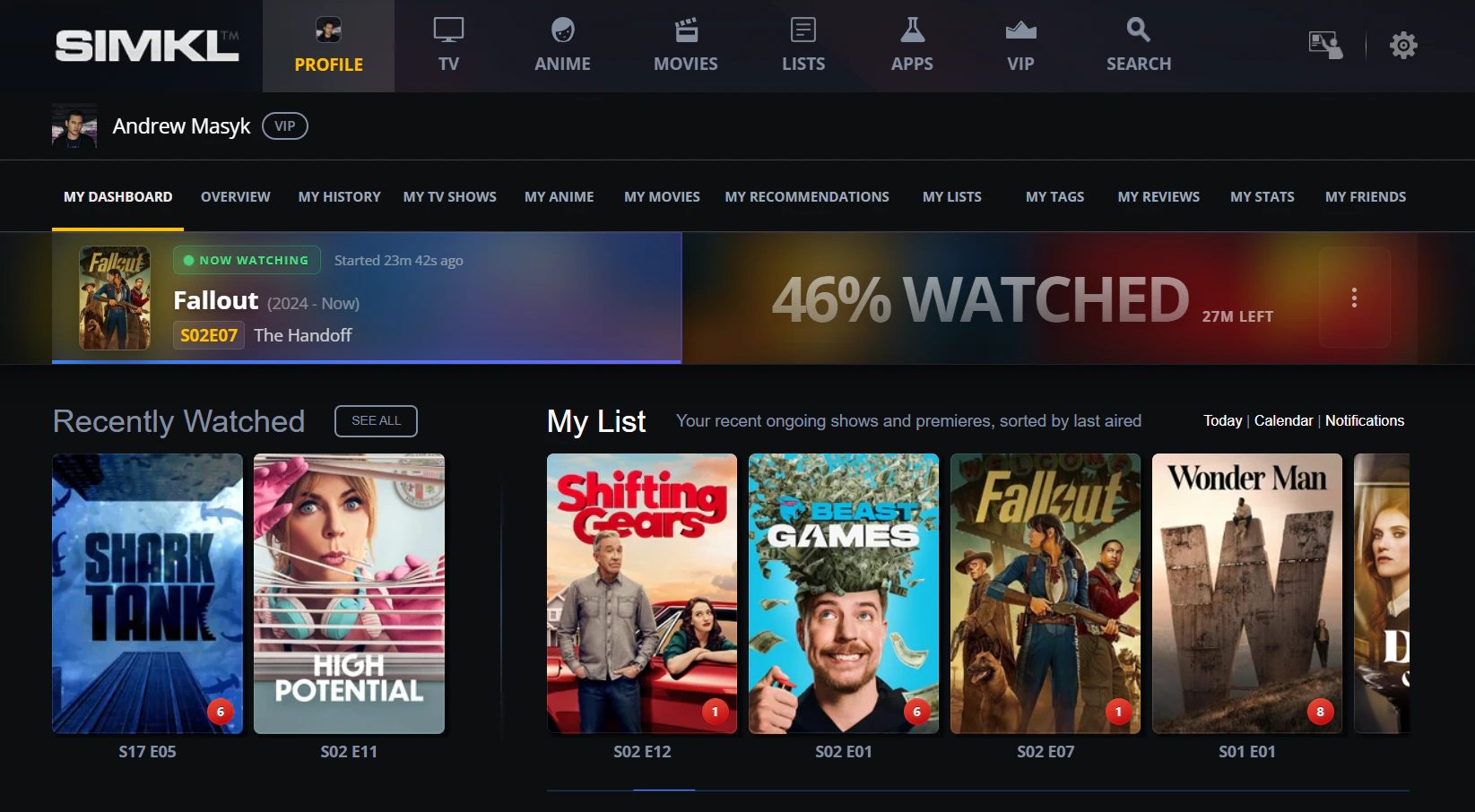
| [`POST /scrobble/start`](/api-reference/simkl/scrobble-start) | Marks the user as **"Watching now"** on their profile. Does **not** mark the item as watched. |
| [`POST /scrobble/pause`](/api-reference/simkl/scrobble-pause) | Saves the current `progress` so the user can resume later. |
| [`POST /scrobble/stop`](/api-reference/simkl/scrobble-stop) | Ends the session. With `progress` ≥ 80%, marks the item watched; below that, the session is kept as a resumable pause. |
| [`POST /scrobble/checkin`](/api-reference/simkl/scrobble-checkin) | Like [`start`](/api-reference/simkl/scrobble-start), but Simkl **auto-marks the item watched when its computed progress reaches 100%** based on the item's runtime — no further calls needed from your app. Use this when you can't reliably hook into stop events. |
**Start ≠ watched.** A bare [`start`](/api-reference/simkl/scrobble-start) only puts the title in the user's "Watching now" banner. The item gets marked as watched only when:
* you call [`stop`](/api-reference/simkl/scrobble-stop) with progress ≥ 80%, **or**
* you used [`checkin`](/api-reference/simkl/scrobble-checkin) and the auto-tracked progress reaches 100%, **or**
* you separately call [`POST /sync/history`](/api-reference/simkl/add-to-history).
## How it works
Simkl stores **one active scrobble session per show/movie/anime**. Calling `/scrobble/start` **replaces any existing session** for that item and **clears previous pauses**. Paused sessions (created by `/scrobble/pause`, or by `/scrobble/stop` with progress under 80%) can be retrieved via [Get Playbacks](/api-reference/simkl/get-playback-sessions) and resumed by calling `/scrobble/start` again with the same item. To delete a paused session, use [Delete Playback](/api-reference/simkl/delete-playback).
### Lifecycle at a glance
Progress drives every transition. The 80% threshold is the only "magic number" you have to remember.
```
progress ≥ 80
┌──────────────► action: scrobble (marked watched)
start ──► pause ──► start ──► stop ┤
0% 45% 45% ? │ progress < 80
└──────────────► action: pause (resumable)
checkin ────────────────────────────► (no progress; auto-scrobbles at 100% from runtime)
```
* **Two ways to mark something watched.** Either drive [`start`](/api-reference/simkl/scrobble-start) → [`stop`](/api-reference/simkl/scrobble-stop) ≥ 80% yourself, or fire [`checkin`](/api-reference/simkl/scrobble-checkin) once and let Simkl auto-complete from the item's runtime.
* **`progress` is required for [`start`](/api-reference/simkl/scrobble-start) / [`pause`](/api-reference/simkl/scrobble-pause) / [`stop`](/api-reference/simkl/scrobble-stop)** (defaults to `0` if you omit it). On [`checkin`](/api-reference/simkl/scrobble-checkin) it is silently dropped server-side.
* **`simkl` ID alone is enough** for any of the four endpoints. Title + year + extra IDs help when you don't have a `simkl` ID and need Simkl's matcher to find the item.
### Typical flow
User presses Play in your app → `POST /scrobble/start` (or `/scrobble/checkin` if you want auto-completion). Title appears in the "Watching now" banner.
User pauses → `POST /scrobble/pause` with current `progress`. The session is kept as resumable.
User unpauses → `POST /scrobble/start` again with current `progress`. Same session continues.
User stops or finishes → `POST /scrobble/stop` with current `progress`. ≥ 80% marks watched; lower is kept as a pause.
**Use [`checkin`](/api-reference/simkl/scrobble-checkin) for fire-and-forget tracking** — when you have an item's runtime but no reliable "stop" event (e.g. some embedded players, casting flows). Simkl extrapolates progress from the start time + runtime and marks the item watched automatically when 100% is reached.
Members can view and manage their saved playbacks at [simkl.com/my/history/playback-progress-manager/](https://simkl.com/my/history/playback-progress-manager/).
### Action types in responses
The response `action` field tells you what Simkl did with your call:
| Value | When you'll see it |
| ---------- | ------------------------------------------------------------------------------------------- |
| `start` | Returned by `/scrobble/start` when beginning or resuming. |
| `checkin` | Returned by `/scrobble/checkin` — Simkl will auto-scrobble at 100% from the item's runtime. |
| `pause` | Returned by `/scrobble/pause`, or by `/scrobble/stop` when progress \< 80%. |
| `scrobble` | Returned by `/scrobble/stop` when progress ≥ 80% — item marked as watched. |
### Session management
* **Expiry timestamps:** start = now + remaining runtime; stop = now + 1 hour; pause = now.
* **Persistence:** sessions persist until manually removed or replaced by the next scrobble for that title. Retention by plan: Free 7 days, PRO 30 days, VIP 90 days.
* **Rate limiting:** one scrobble operation per user at a time (20-second lock).
* **Duplicate prevention:** `409` if you try to stop an already-completed session within 1 hour.
### Anime episode numbering
Simkl uses **AniDB** as the primary source for anime data, which numbers seasons/episodes differently from TMDB/TVDB. When you scrobble anime using TMDB season/episode numbers, Simkl maps them to the corresponding AniDB episode. Responses include both the Simkl/AniDB numbers (`season`, `number`) and the original TVDB numbers (`tvdb_season`, `tvdb_number`) for reference.
## Endpoints
`POST /scrobble/start` — show "Watching now"; resume a paused session.
`POST /scrobble/checkin` — auto-mark watched at 100% based on runtime.
`POST /scrobble/pause` — save progress so the user can resume.
`POST /scrobble/stop` — end session; ≥ 80% marks watched.
### Playbacks
`GET /sync/playback` — list saved paused playbacks (cross-device resume; optionally narrow with `/:type` where `:type` is `episodes` or `movies`).
`DELETE /sync/playback/:id` — remove a saved playback by ID.
| Endpoint | Effect |
| ----------------------------------------------------------------- | ------------------------------------------------------------------------------------------------------------------------------------------------------------------------------------------------------------------------------------------------------------------- |
| [`POST /scrobble/start`](/api-reference/simkl/scrobble-start) | Marks the user as **"Watching now"** on their profile. Does **not** mark the item as watched. |
| [`POST /scrobble/pause`](/api-reference/simkl/scrobble-pause) | Saves the current `progress` so the user can resume later. |
| [`POST /scrobble/stop`](/api-reference/simkl/scrobble-stop) | Ends the session. With `progress` ≥ 80%, marks the item watched; below that, the session is kept as a resumable pause. |
| [`POST /scrobble/checkin`](/api-reference/simkl/scrobble-checkin) | Like [`start`](/api-reference/simkl/scrobble-start), but Simkl **auto-marks the item watched when its computed progress reaches 100%** based on the item's runtime — no further calls needed from your app. Use this when you can't reliably hook into stop events. |
**Start ≠ watched.** A bare [`start`](/api-reference/simkl/scrobble-start) only puts the title in the user's "Watching now" banner. The item gets marked as watched only when:
* you call [`stop`](/api-reference/simkl/scrobble-stop) with progress ≥ 80%, **or**
* you used [`checkin`](/api-reference/simkl/scrobble-checkin) and the auto-tracked progress reaches 100%, **or**
* you separately call [`POST /sync/history`](/api-reference/simkl/add-to-history).
## How it works
Simkl stores **one active scrobble session per show/movie/anime**. Calling `/scrobble/start` **replaces any existing session** for that item and **clears previous pauses**. Paused sessions (created by `/scrobble/pause`, or by `/scrobble/stop` with progress under 80%) can be retrieved via [Get Playbacks](/api-reference/simkl/get-playback-sessions) and resumed by calling `/scrobble/start` again with the same item. To delete a paused session, use [Delete Playback](/api-reference/simkl/delete-playback).
### Lifecycle at a glance
Progress drives every transition. The 80% threshold is the only "magic number" you have to remember.
```
progress ≥ 80
┌──────────────► action: scrobble (marked watched)
start ──► pause ──► start ──► stop ┤
0% 45% 45% ? │ progress < 80
└──────────────► action: pause (resumable)
checkin ────────────────────────────► (no progress; auto-scrobbles at 100% from runtime)
```
* **Two ways to mark something watched.** Either drive [`start`](/api-reference/simkl/scrobble-start) → [`stop`](/api-reference/simkl/scrobble-stop) ≥ 80% yourself, or fire [`checkin`](/api-reference/simkl/scrobble-checkin) once and let Simkl auto-complete from the item's runtime.
* **`progress` is required for [`start`](/api-reference/simkl/scrobble-start) / [`pause`](/api-reference/simkl/scrobble-pause) / [`stop`](/api-reference/simkl/scrobble-stop)** (defaults to `0` if you omit it). On [`checkin`](/api-reference/simkl/scrobble-checkin) it is silently dropped server-side.
* **`simkl` ID alone is enough** for any of the four endpoints. Title + year + extra IDs help when you don't have a `simkl` ID and need Simkl's matcher to find the item.
### Typical flow
User presses Play in your app → `POST /scrobble/start` (or `/scrobble/checkin` if you want auto-completion). Title appears in the "Watching now" banner.
User pauses → `POST /scrobble/pause` with current `progress`. The session is kept as resumable.
User unpauses → `POST /scrobble/start` again with current `progress`. Same session continues.
User stops or finishes → `POST /scrobble/stop` with current `progress`. ≥ 80% marks watched; lower is kept as a pause.
**Use [`checkin`](/api-reference/simkl/scrobble-checkin) for fire-and-forget tracking** — when you have an item's runtime but no reliable "stop" event (e.g. some embedded players, casting flows). Simkl extrapolates progress from the start time + runtime and marks the item watched automatically when 100% is reached.
Members can view and manage their saved playbacks at [simkl.com/my/history/playback-progress-manager/](https://simkl.com/my/history/playback-progress-manager/).
### Action types in responses
The response `action` field tells you what Simkl did with your call:
| Value | When you'll see it |
| ---------- | ------------------------------------------------------------------------------------------- |
| `start` | Returned by `/scrobble/start` when beginning or resuming. |
| `checkin` | Returned by `/scrobble/checkin` — Simkl will auto-scrobble at 100% from the item's runtime. |
| `pause` | Returned by `/scrobble/pause`, or by `/scrobble/stop` when progress \< 80%. |
| `scrobble` | Returned by `/scrobble/stop` when progress ≥ 80% — item marked as watched. |
### Session management
* **Expiry timestamps:** start = now + remaining runtime; stop = now + 1 hour; pause = now.
* **Persistence:** sessions persist until manually removed or replaced by the next scrobble for that title. Retention by plan: Free 7 days, PRO 30 days, VIP 90 days.
* **Rate limiting:** one scrobble operation per user at a time (20-second lock).
* **Duplicate prevention:** `409` if you try to stop an already-completed session within 1 hour.
### Anime episode numbering
Simkl uses **AniDB** as the primary source for anime data, which numbers seasons/episodes differently from TMDB/TVDB. When you scrobble anime using TMDB season/episode numbers, Simkl maps them to the corresponding AniDB episode. Responses include both the Simkl/AniDB numbers (`season`, `number`) and the original TVDB numbers (`tvdb_season`, `tvdb_number`) for reference.
## Endpoints
`POST /scrobble/start` — show "Watching now"; resume a paused session.
`POST /scrobble/checkin` — auto-mark watched at 100% based on runtime.
`POST /scrobble/pause` — save progress so the user can resume.
`POST /scrobble/stop` — end session; ≥ 80% marks watched.
### Playbacks
`GET /sync/playback` — list saved paused playbacks (cross-device resume; optionally narrow with `/:type` where `:type` is `episodes` or `movies`).
`DELETE /sync/playback/:id` — remove a saved playback by ID.